KoolReport's Forum

Official Support Area, Q&As, Discussions, Suggestions and Bug reports.
Forum's Guidelines

Card cssStyle does not work #3439

Open Newton opened this topic on on Apr 29, 2025 - 5 comments

Newton commented on Apr 29, 2025

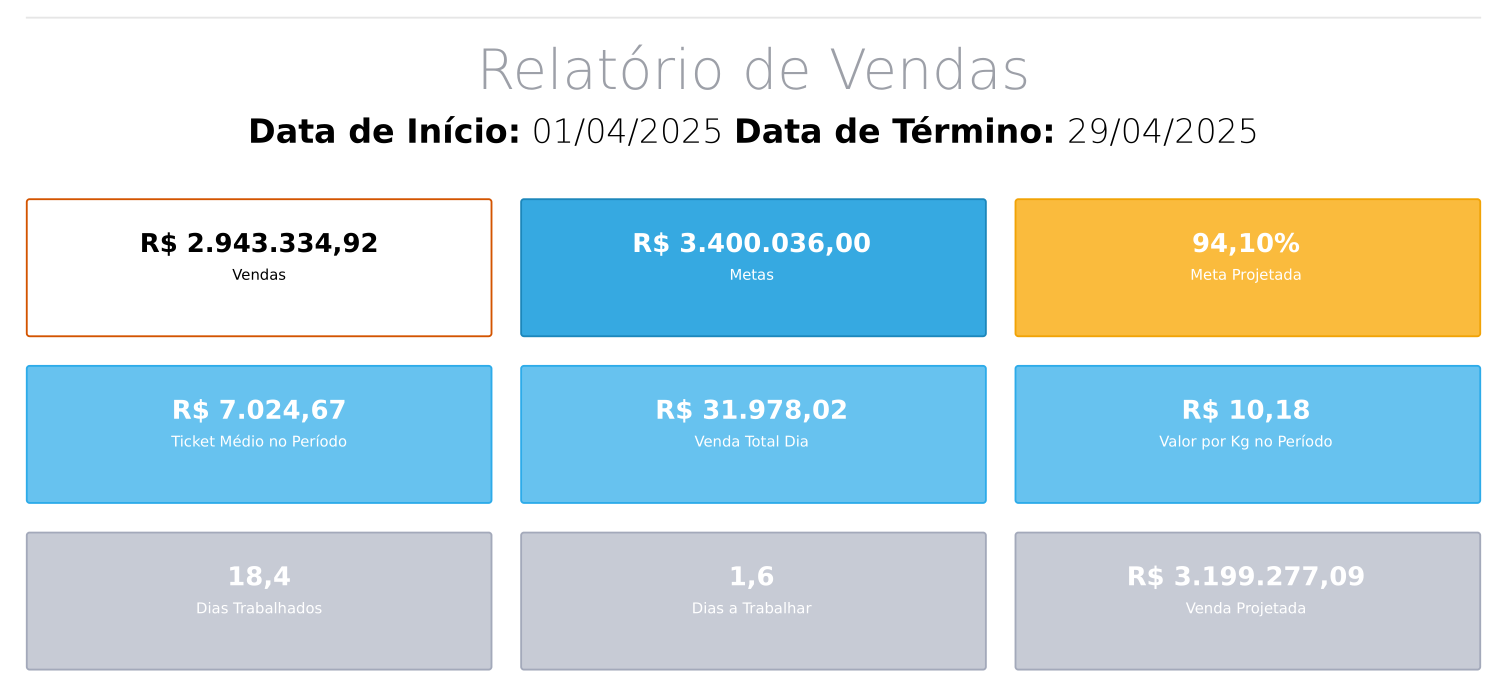
I need to customize the Cards of a report using cssStyle, but when I insert this property, only border-color receives the customization inserted.

In the example below, the colors inserted in the card background, value color and title color did not work.

<?php
use koolreport\widgets\koolphp\Card;
?>
<html lang="pt-BR">
<head>
  <title>Relatório</title>
  <meta charset="UTF-8">
  <style>
    * {
        color-adjust: exact !important;
      -webkit-print-color-adjust: exact !important;
    }

    @media print {
      body {
        -webkit-print-color-adjust: exact !important;
      }
    }
    .report-content{
        margin-bottom: 50px;
    }
  </style>
</head>
<body style="margin:0.5cm 1cm 0.5cm 1cm">

<div class="page-header" style="text-align:right"><i>Nacional Telha</i></div>
<div class="page-footer" style="text-align:right">Pág. {pageNum}</div>
<hr/>
<div class="report-content">
  <div class="text-center">
    <h1 class="display-1 text-muted">Relatório de Vendas</h1>
    <h3 class="display-4"> <b>Data de Início:</b> <?php echo $this->dataStore('venda_projetada')[0]['DataInicio']->format('d/m/Y') ?> <b>Data de Término: </b>
      <?php echo now()->format('d/m/Y') ?></h3>
  </div>
</div>
<div class="row">
    <div class="col-md-4">
      <?php
      $vendas = $this->dataStore('venda_total_por_empresa_data')->sum('ValorTelhas');
      $metas = $this->dataStore('metas_por_vendedor_mes')->sum('metavalor');
      $vendaProjetada = $this->dataStore('venda_projetada')->sum('ProjecaoMensal');
      $metaAtingida = $vendas / $metas * 100;
      switch ($metaAtingida) {
        case $metaAtingida >= 100:
          $cor = 'bg-success';
          break;
        case $metaAtingida >= 80:
          $cor = 'bg-warning';
          break;
        default:
          $cor = 'bg-danger';
      }
      Card::create([
        "title"=>"Vendas",
        "value"=>$vendas,
        "format"=>[
          "value"=>function($value){
            return 'R$ ' . number_format($value, 2, ',', '.');
          },
        ],
        "cssStyle"=>[
          "negative"=>"color:#ddd",
          "positive"=>"color:#0f0",
          "indicator"=>"font-size:16px",
          "card"=>"border-color:#d35400;background:#bb8fce;",
          "value"=>"color:blue",
          "title"=>"color:green",
        ],
      ]);
      ?>
    </div>
    <div class="col-md-4">
      <?php
      Card::create([
        "title"=>"Metas",
        "value"=>$metas,
        "format"=>[
          "value"=>function($value){
            return 'R$ ' . number_format($value, 2, ',', '.');
          },
        ],
        "cssClass"=>[
          "card"=>"bg-primary",
          "title"=>"text-white",
          "value"=>"text-white",
        ]
      ]);
      ?>
    </div>
    <div class="col-md-4">
      <?php
      Card::create([
        "title"=>"Meta Projetada",
        "value"=>$vendaProjetada / $metas * 100,
        "format"=>[
          "value"=>function($value){
            return number_format($value, 2, ',', '.') . '%';
          },
        ],
        "cssClass"=>[
          "card"=>$cor,
          "title"=>"text-white",
          "value"=>"text-white",
        ]
      ]);
      ?>
    </div>
</div>
</body>
</html>

Sebastian Morales commented on May 2, 2025

Pls test your Card cssStyle with our example to see if it works in standalone page:

https://www.koolreport.com/examples/reports/koolphp_card/card/

Then inspect the card element in your page (right mouse click => Inspect element) to see if the css style rules are there as you intended and if there is any other rule that overrides them?

Newton commented on May 2, 2025

Hello Sebastian I ran the test and found that the problem is related to the PDF export. When the report is rendered in a view, the cssStyle works correctly, but when the export to PDF is performed, the cssStyle does not work correctly. Below I have put a simple test demonstrating the problem. Can you help me solve this please?

class TestesController extends Controller
{
    public function teste()
  {

    $arquivo = Storage::disk('tenant')->path("media/pdfs/myreport.pdf");

    $report = new MyReport();
//    $report->run()->render();
    $report->run()
      ->export('MyReport')
      ->settings([
        'phantomjs' => public_path() . '/js/phantomjs',
        'pageWaiting' => 'load',
        'useLocalTempFolder' =>true,
      ])
      ->pdf([
        'displayHeaderFooter' => true,
        'format' => 'A4',
        'orientation' => 'landscape'
      ])
      ->saveAs($arquivo);
  }
}
<?php

namespace Galileo\Custom\Itg\Reports;

use koolreport\amazing\Theme;
use koolreport\clients\Bootstrap;
use koolreport\export\Exportable;
use koolreport\laravel\Friendship;

class MyReport extends \koolreport\KoolReport
{
  use Bootstrap;
  use Friendship;
  use Theme;
  use Exportable;
  public function settings()
  {
    return [
      "dataSources" => [
        'vendas' => [
          'class' => 'koolreport\datasources\ArrayDataSource',
          'dataformat' => 'table',
          'data' => [
            ['nome'=>'João', 'valor'=>100],
          ],
        ],
      ]
    ];
  }

  protected function setup()
  {
    $this->src('vendas')
      ->pipe($this->dataStore('vendas'));
  }
}
<?php
use \koolreport\widgets\koolphp\Card;
?>
<div class="report-content">
  <div class="text-center" style="margin-top:30px;">
    <h3>Get value with SQL Query</h3>
    <p class="lead">
      The value of card is able to receive value from SQL
    </p>
  </div>

  <div class="row">
    <div class="col-md-4 offset-md-4">
      <?php
      \koolreport\widgets\koolphp\Card::create([
        "title"=>"Vendas",
        "value"=>$this->dataStore('vendas')->sum('valor'),
        "format"=>[
          "value"=>function($value){
            return 'R$ ' . number_format($value, 2, ',', '.');
          },
        ],
        "cssStyle"=>[
          "negative"=>"color:#ddd",
          "positive"=>"color:#0f0",
          "indicator"=>"font-size:16px",
          "card"=>"border-color:#28b463;background:#6c3483;",
          "value"=>"color:#95a5a6",
          "title"=>"color:#95a5a6",
        ],
      ]);
      ?>
    </div>
  </div>
  <div class="row">
    <div class="col-md-4 offset-md-4">
      <?php
      \koolreport\widgets\koolphp\Card::create([
        "title"=>"Vendas",
        "value"=>50000,
        "format"=>[
          "value"=>function($value){
            return 'R$ ' . number_format($value, 2, ',', '.');
          },
        ],
        "cssClass"=>[
          "card"=>"bg-primary",
          "title"=>"text-white",
          "value"=>"text-white",
        ]
      ]);
      ?>
    </div>
  </div>

</div>

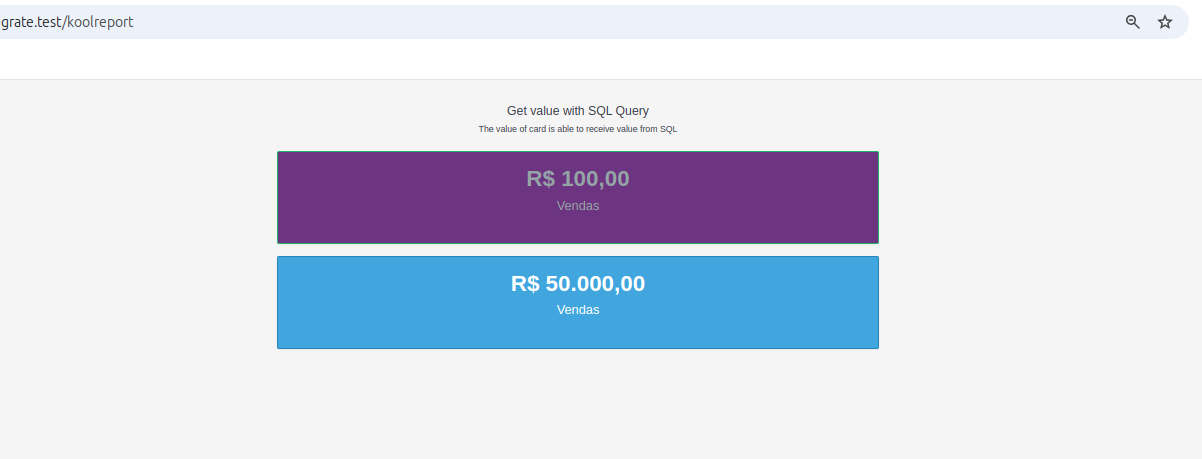
When rendered in the browser

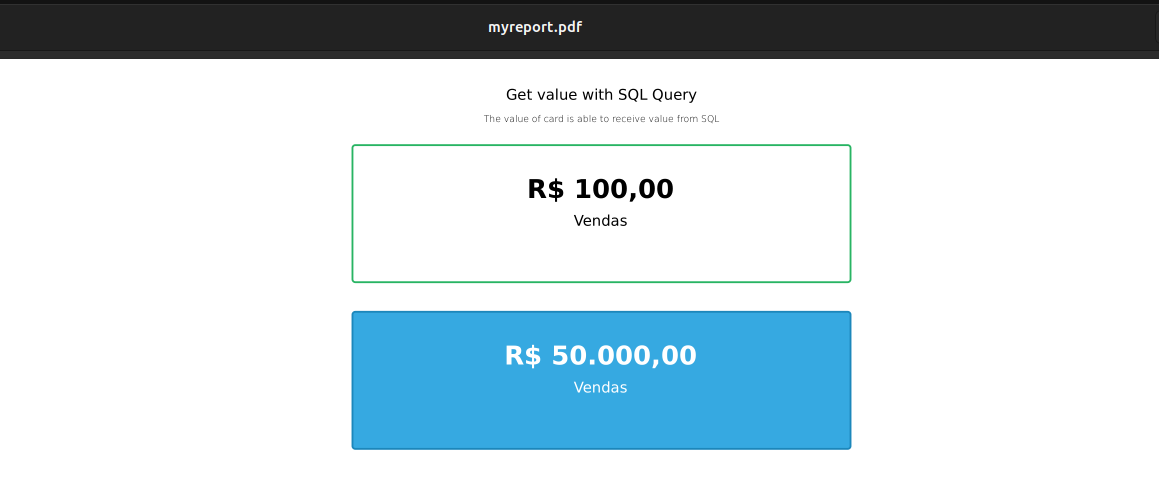
When exported to pdf

Sebastian Morales commented on May 5, 2025

For Card css rules to work in PDF rendering, pls add the following in page style to your report PDF view file:

<style>
    @media print {
        .card-value {
            color: blue !important;
        }
        .card-title {
            color: green !important;
        }
        .card {
            background-color: #bb8fce !important;
            border-color:#d35400 !important;
        }
    }
</style>

If you need rules for other elements just inspect it in your web page for find out their css classes and use them as selectors in this style @media print.

Newton commented on May 5, 2025

Hello Sebastian,

Thank you for the guidance. I was able to print with the desired formatting, but wouldn't it be correct for the cssStyle parameter to work for printing? I ask this because we will need to customize several parts of a report and not being able to use the cssStyle parameter ends up greatly affecting our productivity. Is the fact that this parameter does not work a bug in Koolreport? Is it possible to make adjustments so that this will work?

Sebastian Morales commented on May 6, 2025

This is a limitation of the PDF engine that Export uses. To work around this, in your PDF view you could name your Card widget and use that unique name for CSS selector:

<style>
    @media print {
        #MyCard .card-value { /* add this id selector so that this rule only works on this Card */
            color: blue !important;
        }
        ...
    }
</style> 
<?php
    \koolreport\widgets\koolphp\Card::create(array(
        "name" => "MyCard",
        ...
    ));

Build Your Excellent Data Report

Let KoolReport help you to make great reports. It's free & open-source released under MIT license.

Download KoolReport View demo
None yet

None